Installation
v1.0
Search this version
Installation
Installation
Title
Message
Create new category
What is the title of your new category?
Edit page index title
What is the title of the page index?
Edit category
What is the new title of your category?
Edit link
What is the new title and URL of your link?
Formatting Text
Copy Markdown
Open in ChatGPT
Open in Claude
There are three ways to format your text:
Using Toolbar
To format text in your documentation, highlight with your cursor the chunk of text you want to format. A toolbar like this one will show.
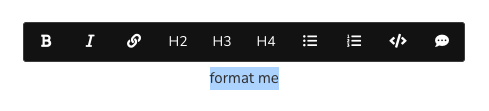
Toolbar formatting options
Using the toolbar you can do the following:
- Bold
- Italics
- External link
- Heading 2
- Heading 3
- Heading 4
- Unordered list
- Ordered list
- Inline code
- Comment
Tips & Tricks
If you need to write down text that contains HTML tags, then you can do so if it is inserted as line code, as such:
<body><p>Hey</p></body>.
Hungry for more?
If you need more formatting options, speak to us!
Type to search, ESC to discard
Last updated on
Was this page helpful?
Next to read:
Using MarkdownDiscard Changes
Do you want to discard your current changes and overwrite with the template?
Archive Synced Block
Message
Create new Template
What is this template's title?
Delete Template
Message